
"How did you hear about us?" - the WooCommerce survey that pays for itself
Click tracking sees where traffic comes from. It does not see the friend who recommended you, the podcast they heard, or the marketplace listing that started the journey. A one-question survey on the order confirmation page catches what pixels miss.
Why click tracking misses real attribution
Analytics tools attribute the last click. That works when the last click caused the sale - and it often did not:
- Word of mouth. The friend who recommended you leaves no referrer header. The visit shows up as "direct" or as a branded Google search, and your analytics credits Google for your customer's enthusiasm.
- Dark social. Links shared in WhatsApp groups, Slack channels, and private messages arrive with no source attached.
- Podcasts, radio, print, packaging. Offline channels generate a search for your name, which reporting files under "organic".
- Blocked and declined tracking. Ad blockers and refused consent banners make a real share of customers invisible to the pixel entirely.
The result is a systematic bias: measurable channels look stronger than they are, and unmeasurable channels look nonexistent. GA4's channel report is honest about what it saw - it is just blind to everything above. Budget follows the measurement, so the bias feeds itself: money flows toward the channel that reports best, not the one that works best.
A post-purchase survey is the cheapest correction available - you simply ask the person who just paid. It will never give you session-level precision, but it answers the question attribution tools get wrong: where customers say they came from, in their own words.
Where the question goes (and where it doesn't)
The thank-you (order confirmation) page is the standard spot: the customer just finished paying, engagement is highest, and the answer attaches directly to the order - so you can report revenue per channel, not just counts.
Alternatives and their trade-offs:
- Checkout page - adds friction before payment; avoid. The only thing worse than not knowing the source is losing the order asking about it.
- Follow-up email - reaches non-payers too, but response rates drop sharply and the answer is no longer automatically linked to the order.
- My Account page - a useful catch-up spot for registered customers who skipped the question after checkout, as a secondary location rather than the main one.
One placement detail matters more than the rest: the survey must sit on the confirmation screen the customer actually sees after paying. With the classic WooCommerce checkout that is the order-received page; with block checkout it is the order confirmation area. Whichever you run, place a test order and verify the question renders there - a survey configured for the classic page that never appears in the block flow collects nothing and reports nothing.
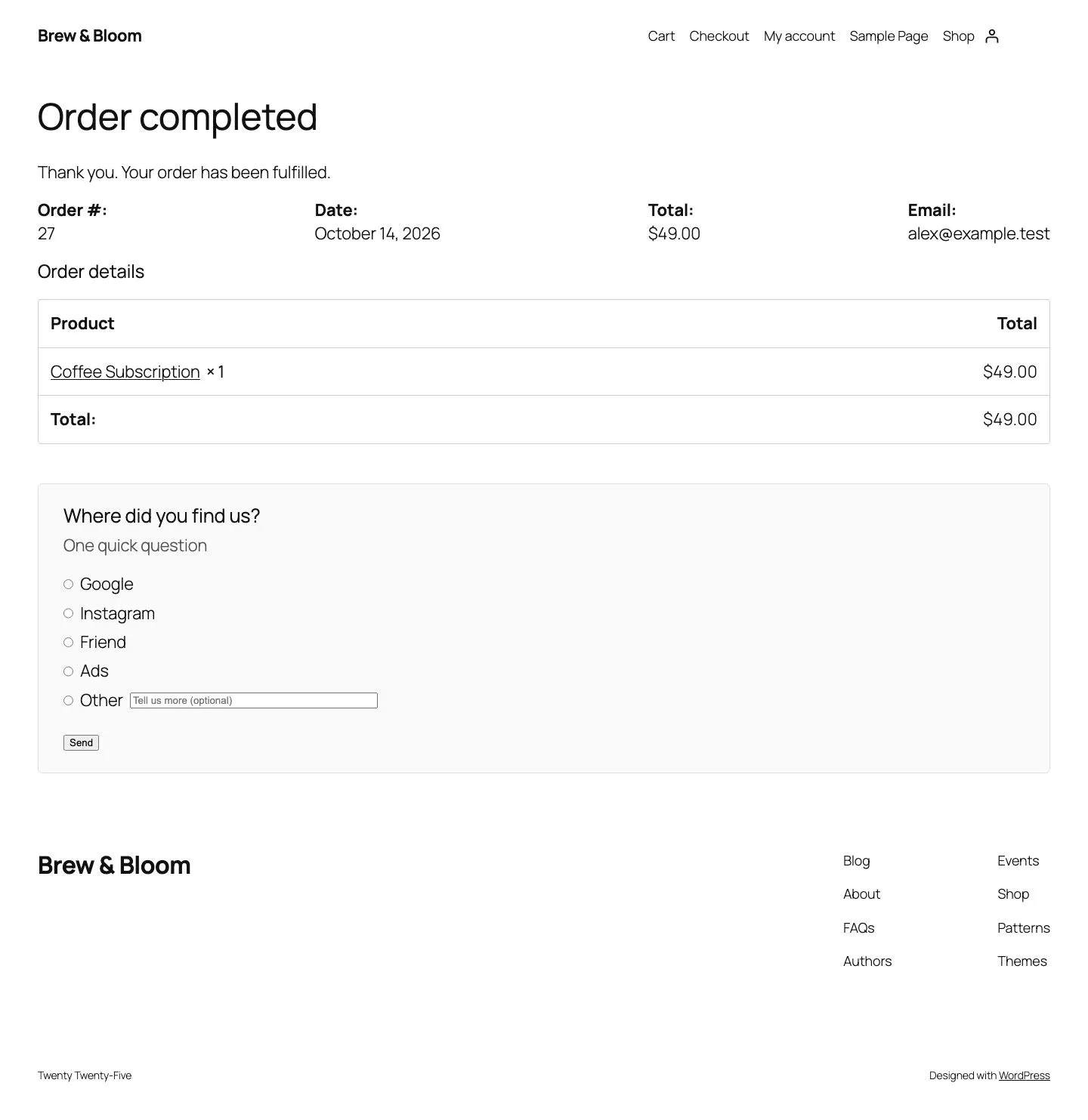
Writing the answer options
Keep it to one click. The option list is where surveys succeed or stall - a wall of twelve channels drops the response rate, while a list missing the real answer teaches "Other" to carry your data.
A set that covers reality for most stores:
- Google search
- Instagram / Facebook
- TikTok or YouTube
- A friend or colleague
- A marketplace (Etsy, Amazon, etc.)
- Email newsletter
- Other (short free text)
Design notes:
- Cap it around 6-8 options. Enough to cover real channels, few enough to answer in two seconds.
- Name your actual channels. If you run Pinterest ads, "Pinterest" earns a line. Options should name what you spend on or suspect exists.
- Keep "Other" short and free. The free-text field is your discovery mechanism - it catches the podcast, the forum, the festival booth you forgot. Read the text monthly; when the same word keeps appearing, promote it to a real option.
- "A friend told me" is load-bearing. Word of mouth is almost always under-tracked and often top-ranked. Leaving it off the list because "we can't act on it" hides your best channel.
- Order does not matter much - but put the likely winners first. Most respondents pick within the first few options, so lead with the channels you most suspect rather than alphabetical order.
Reading the report: orders, revenue, AOV by channel
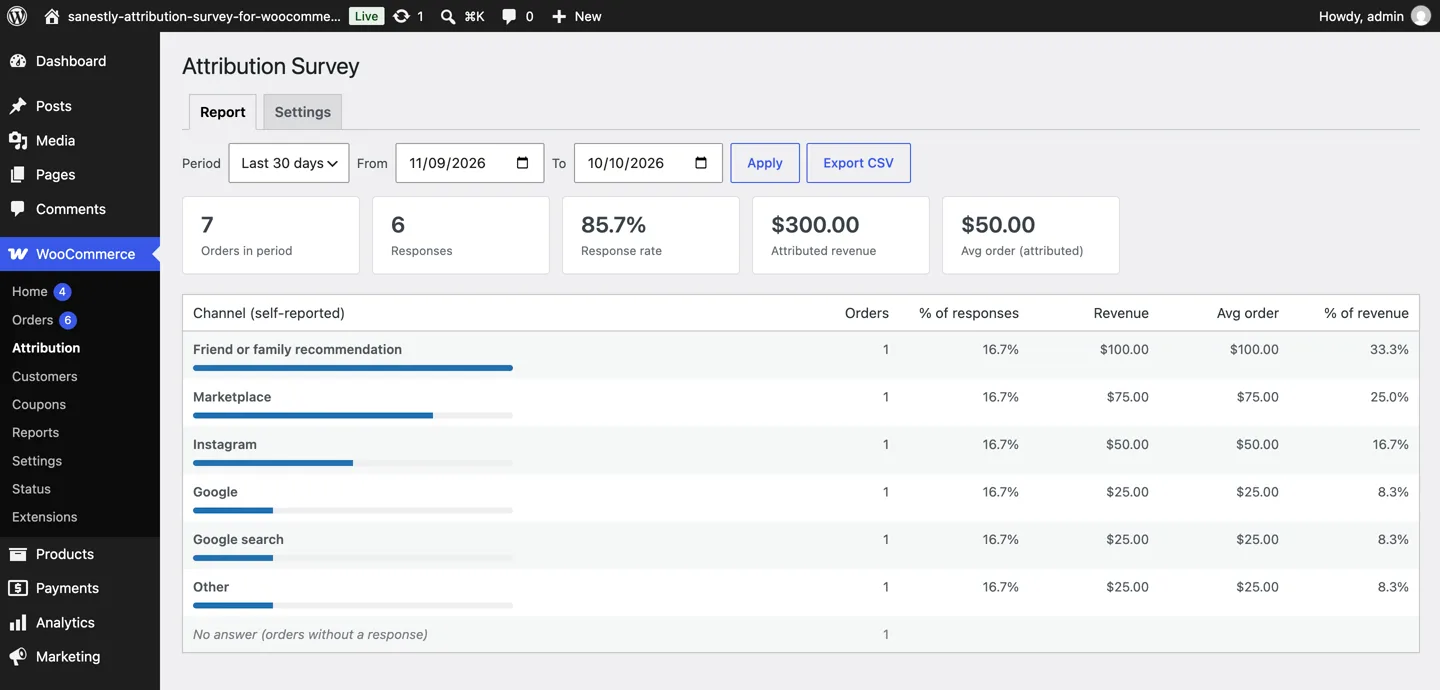
Answers without order data are trivia. What matters is the join with orders - and because a WooCommerce post-purchase survey sits on the order itself, every answer carries a revenue figure with it. Read the report in four columns:
| Channel | Orders | Revenue | AOV | Share of responses |
|---|---|---|---|---|
| Google search | 41 | €2,870 | €70 | 34% |
| A friend told me | 33 | €2,970 | €90 | 28% |
| 22 | €1,210 | €55 | 18% | |
| Marketplace | 14 | €910 | €65 | 12% |
| Other | 10 | €430 | €43 | 8% |
The example shows the two reads that matter:
- Revenue, not count. "Friend" ranks second on orders but first on revenue - word-of-mouth customers often spend more than ad-driven ones, and only the revenue column shows it.
- AOV differences are signal. A channel with few orders but high AOV can outrank your biggest source. A channel with many orders and low AOV may be buying volume, not value.
Two honest caveats:
- Self-reported is not proven. People answer where they think they heard about you, which is often the most memorable touch rather than the first. Treat it as the customer's own account, not forensic truth.
- Watch the response rate. Proportions only mean something if enough customers answered. A 15% response rate still tells you plenty at 200 orders; at 20 orders it tells you almost nothing.
Getting a response rate worth reading
Response rate is the whole game - the question costs nothing per answer, so the only variable is how many customers bother.
- One click, no typing required. Radio options, not a text field. "Other" can carry an optional box, but nothing on the form should be required.
- Ask immediately. The confirmation-page moment is when the customer is most willing. Every later ask - email, account page - gets a fraction of the response.
- Use order language, not survey language. "Quick question - how did you find us?" outperforms "Please complete our attribution survey".
- Do not incentivize. A discount-for-answer biases who responds toward deal-seekers and adds noise to exactly the channel data you are trying to clean up.
- Never make it required. A mandatory question on a confirmation page trains customers that paying you leads to homework.
What is a good rate? Anything under ~10% of orders is too thin to read; 20-40% is typical for a well-placed one-click question, and it climbs when the question reads like a human wrote it. If yours sits far below that, check the placement first - a survey below the fold or inside an email is the usual cause, not customer unwillingness.
Acting on the answers
The classic outcome: a store spending on ads finds "a friend told me" is the top declared channel, so money moves from acquisition to referral and review asks. Or "marketplace" wins, and the standalone site gets repositioned as the destination after a marketplace first sale.
A smaller, commoner win: the report shows a channel at 5% of declared orders while it eats 30% of the ad budget. That is a budget conversation the pixel data could never start, because the pixel data claimed those customers came from Google.
And with small samples, act on direction, not precision: under ~30 responses per channel the percentages wobble, but "a quarter of customers say a friend told them" is actionable at almost any sample size. Three months of answers beats three weeks of guessing.
Re-read the report quarterly, not weekly. Channels shift slowly, and the interesting changes - "Other" answers converging on a new platform, marketplace share creeping up - only show against a few months of baseline. The survey is a compass you check at intervals, not a dashboard you watch.
Our Attribution Survey plugin does the whole loop: one question on the confirmation page (classic and block checkout), answers stored on the order, and a report with orders, revenue, AOV and response rate per channel.